
How to sign up at Moobet from the UK
Moobet opens an account in a minute: an email code, Google or Telegram — no password. This guide walks through each step, the first crypto deposit, identity checks and logging in, and is honest about one thing UK players need to know first: Moobet’s own terms list the United Kingdom as a restricted country.
Affiliate site — we may earn a commission. moo-bet.co.uk is an independent guide, not Moobet itself. 18+ only.
Facts checked on the Moobet website ·
Step 0Before you sign up
If you have read the terms and still want to go ahead, the list of things you need is short:
- You must be 18 or over. Gambling under 18 is illegal, and Moobet’s terms set the same minimum age.
- An email address you can open right now, or a Google or Telegram account. The email route sends a one-time code, so you need inbox access at the moment you sign up.
- A crypto wallet you control. Moobet works with crypto only — on the pages we checked there was no card or bank option. Use a wallet in your own name, not a friend’s.
- A budget and a limit decided in advance. Write it down before you open the site.
You do not need to upload documents to open the account, but Moobet may ask for them later — see identity checks below.
How-toMoobet sign up, step by step
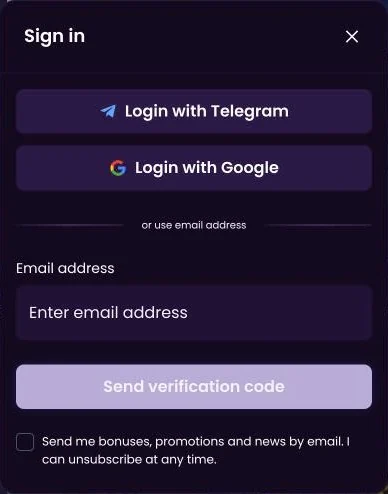
Registration and login share one window on Moobet. We checked the window on the live site on 9 November 2026; the screenshot below shows what you will see after clicking Sign in.
- Open Moobet via our link. Use the Sign up button on this page; it opens the Moobet site in a new tab. Our link is an affiliate link.
- Click Sign in. The Sign in button sits at the top of the page and opens one window for both new and existing accounts.
- Choose a sign-up method. Pick Login with Telegram, Login with Google, or type your email address and press “Send verification code”.
- Enter the verification code. If you chose email, copy the one-time code from your inbox into the window. There is no password to set.
- Decide on marketing emails. The window shows a marketing opt-in checkbox. It is optional — leave it unticked if you do not want promotional mail.
- Set limits before depositing. Open your account settings and set deposit limits or a time-out before you put any crypto into the Wallet.
That is the whole process. Once you are in, the account menu shows Profile, Wallet, History, VIP and Referral. There is no public welcome bonus on the pages we checked; ongoing rewards run through the VIP Club and leaderboards. If you mainly want the in-house games, our page on Moobet Originals explains Mines, Plinko, Wheel, Towers and Dice; for football and other sports, see Moobet sports betting.
Sign up
Email code, Google or Telegram
No password to create. Read Moobet’s restricted-country terms first and set your limits before any deposit.
Sign up at Moobet18+ · Moobet is not licensed by the UK Gambling Commission · Its terms (s.4.1.3, checked 9 November 2026) list the United Kingdom as a restricted country · Affiliate link
WalletWallet and your first crypto deposit
Moobet has no fiat cashier on the pages we checked: balances live in the Wallet, in crypto, and amounts are shown in dollars or in coins. The Wallet lists the supported coins and networks — we have not confirmed a full coin list, so check it there rather than relying on any third-party table.
Click Wallet in the account menu and choose Deposit.
Select the coin you already hold in your own wallet.
Choose the network and check that your sending wallet uses exactly the same one. A transfer sent on the wrong network can be lost for good.
Copy the deposit address, send a small test amount first, and respect the minimum deposit shown in the Wallet.
Crypto transfers cannot be reversed by a bank. Double-check the address, the coin and the network before you confirm, and keep the transaction hash until the deposit appears in your History. Only deposit money you can afford to lose.
VerificationIdentity checks (KYC)
Opening the account only needs an email code, Google or Telegram. That does not mean identity checks never happen. Moobet may ask for identity documents under its terms — for example a photo ID, proof of address or proof of where your funds came from — for instance before a withdrawal is paid out.
Use your real details from day one. An account registered with someone else’s email or wallet is likely to fail these checks, and the terms let the operator close accounts that break its rules. Remember that for UK players the restricted-country clause can also come up at this stage.
LimitsSafer gambling tools to set up first
Set your limits before the first deposit, not after a bad session. On the pages we checked, Moobet offers:
- Deposit limits — a cap on how much you can add over a day, week or month.
- Time-out — a short break that locks the account for a set period.
- Self-exclusion — Moobet has a dedicated self-exclusion page for longer or permanent blocks on your account.
One thing matters a lot in the UK: GAMSTOP only covers operators licensed by the UK Gambling Commission. It does not cover Moobet. If you need protection, register with GAMSTOP and simply do not open offshore accounts. For free, confidential help, talk to GamCare on 0808 8020 133.
Log inHow to log in to Moobet
Logging in uses the same Sign in window as registration. Pick the method you used the first time:
- Email: type the same address, press “Send verification code” and enter the new code.
- Google: click Login with Google and choose the same Google account.
- Telegram: click Login with Telegram and confirm in the Telegram app.
If the code does not arrive
Check the spam and promotions folders, wait a minute or two, then request a new code — only the latest one works. Make sure you typed the address exactly as you registered it. Never forward a verification code to anyone: whoever has the code has your account.
AvoidCommon sign-up mistakes
| Mistake | What can happen | What to do instead |
|---|---|---|
| Sending on the wrong network | The deposit may never arrive and can be lost | Match coin and network in the Wallet; send a test amount |
| Someone else’s email or wallet | Failed identity checks, account closed | Use your own details only |
| Ignoring the restricted-country terms | Account closed, winnings withheld | Read s.4.1.3 of the current terms before signing up |
| No limits set | Spending more than planned | Set a deposit limit before the first deposit |
| Google one day, email the next | Two separate accounts, a balance that “disappears” | Always log in with the method you registered with |
| Sharing a verification code | Someone else takes over the account | Never pass a code on, even to “support” |
Read the terms, set your limits, then decide.
Sign up18+ · Moobet is not licensed by the UK Gambling Commission · If you are self-excluded with GAMSTOP, do not open an account.FAQMoobet sign-up: questions
How do I create a Moobet account?
Open Moobet, click Sign in and choose one method: Login with Telegram, Login with Google, or type your email and press “Send verification code”. Enter the code from your inbox and the account is open. Before that, read Moobet’s terms: on 9 November 2026 they listed the United Kingdom as a restricted country.
Do I need a password?
No. On the pages we checked, Moobet does not ask you to set a password. You sign in with a one-time code sent to your email, or through your Google or Telegram account. Keep that email account and those logins secure, because they are the key to your Moobet balance.
How do I deposit?
Open Wallet from the account menu, pick a coin, choose the network and copy the deposit address. Send from a wallet you control on exactly the same network — a transfer on the wrong network can be lost. The Wallet shows the supported coins, networks and minimums.
How do I log in?
Click Sign in and use the same method you registered with: the email code, Google or Telegram. Switching methods with a different email address can create a second, empty account. If a code does not arrive, check spam, wait a minute and request a new one.
How do I self-exclude?
Use Moobet’s self-exclusion page from inside your account. GAMSTOP only covers sites licensed by the UK Gambling Commission, so it does not block Moobet — if you need protection, register with GAMSTOP and do not open offshore accounts. GamCare offers free, confidential support on 0808 8020 133.
Safer gambling — 18+ only
Crypto games settle in seconds, which makes it easy to lose track of time and money. Decide your limit before you play and stop when you reach it.
- Set a deposit limit and a session time-out in your account before your first bet.
- Use Moobet’s self-exclusion page if you need a break — it closes the account for the period you choose.
- If you are self-excluded with GAMSTOP, do not sign up: Moobet is not part of the scheme, and opening an account would undo the protection you chose.
- Free, confidential help: GamCare and the National Gambling Helpline on 0808 8020 133, and BeGambleAware.org.